
SheetDesk
Open an Excel or CSV file, look through it, fix it and save it, without Office and without uploading anything. Remove duplicates, split big files, merge several into one and draw charts.
- Files never uploaded
- First 20,000 rows free
- No account
The Problem
Spreadsheets arrive messy, too big, or full of other people’s data. Online converters want your file on their server, and Excel is not always there when you need it.
What SheetDesk Does
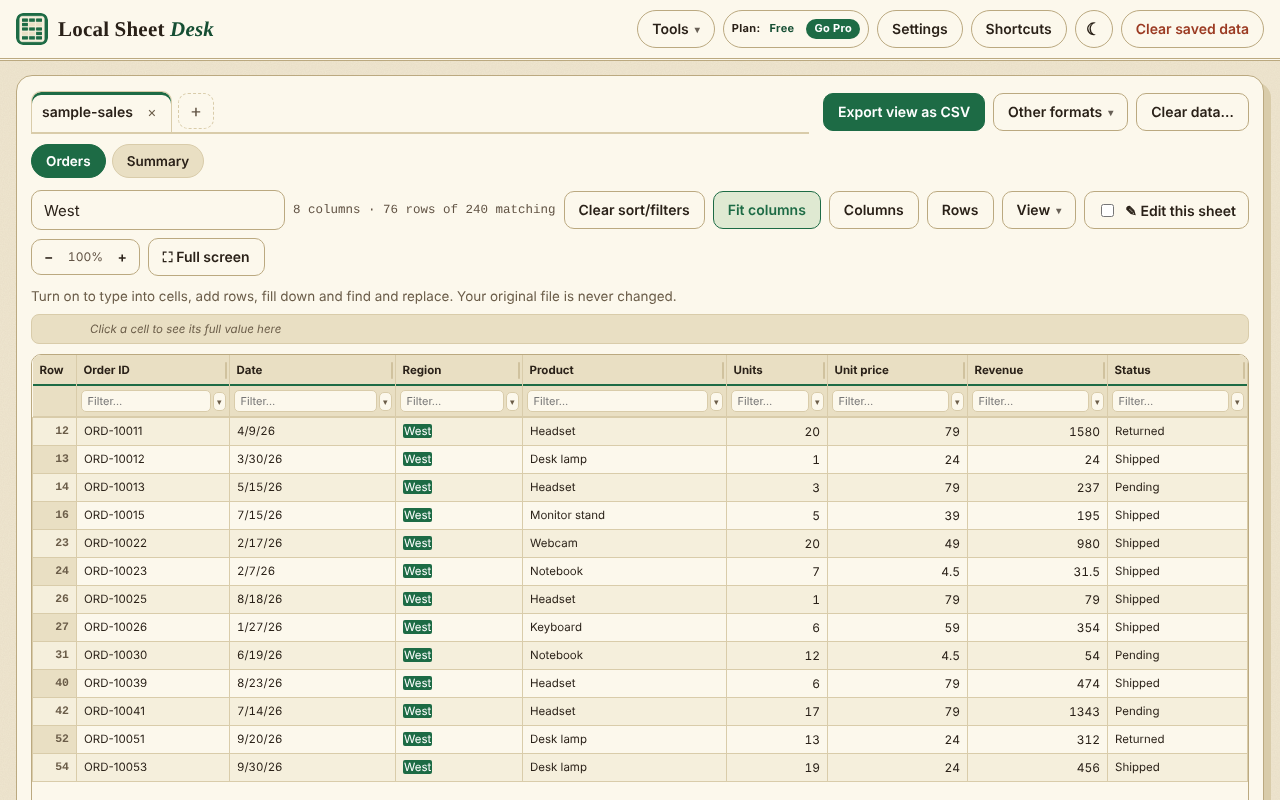
Opens Almost Any Spreadsheet
XLSX, XLS, XLSM, XLSB, ODS, CSV, TSV and DBF files, including password-protected ones. Search, sort and filter, and see colours, charts and pictures as the file has them.
Edit And Save
Change cells, add rows, fill down and find and replace, with unlimited undo. Save a copy as .xlsx. Your original file is never changed.
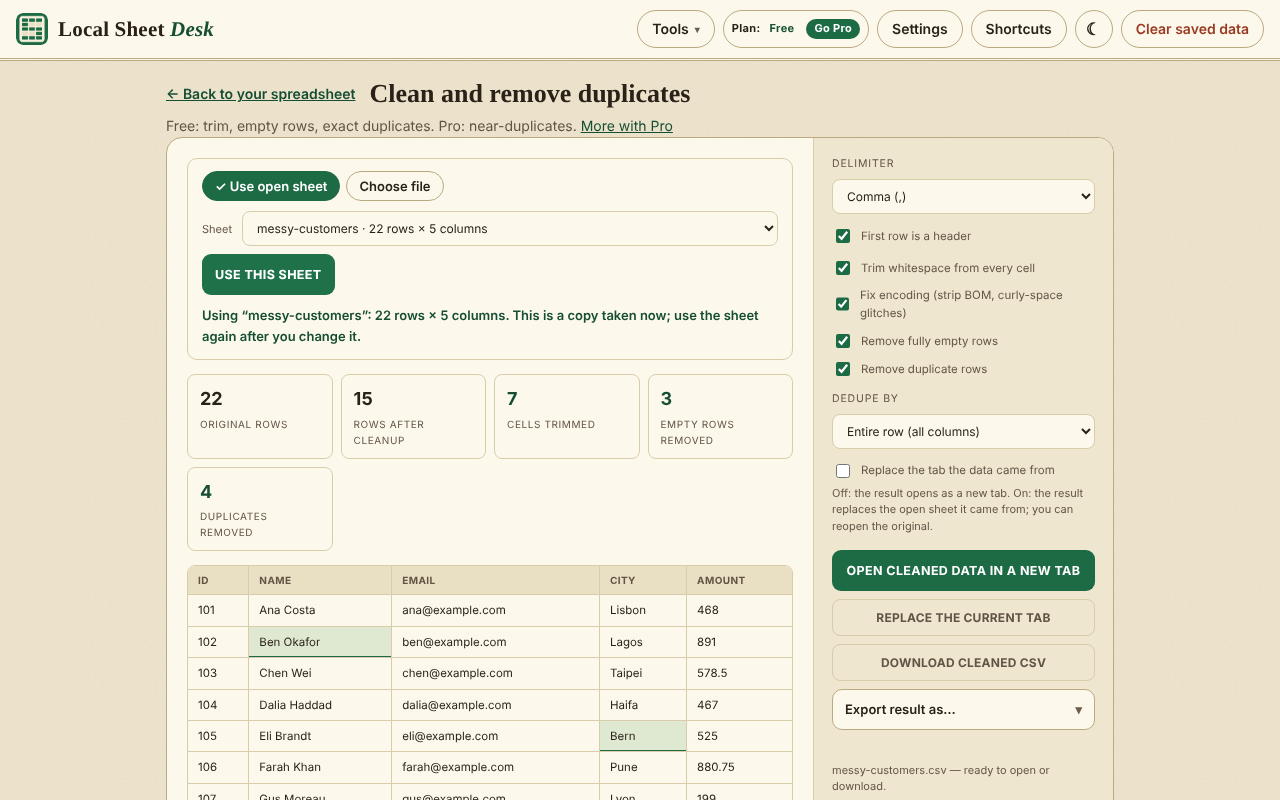
Clean And Remove Duplicates
Trim spaces, remove empty rows and exact duplicates, and see how many rows each step removed before you save.
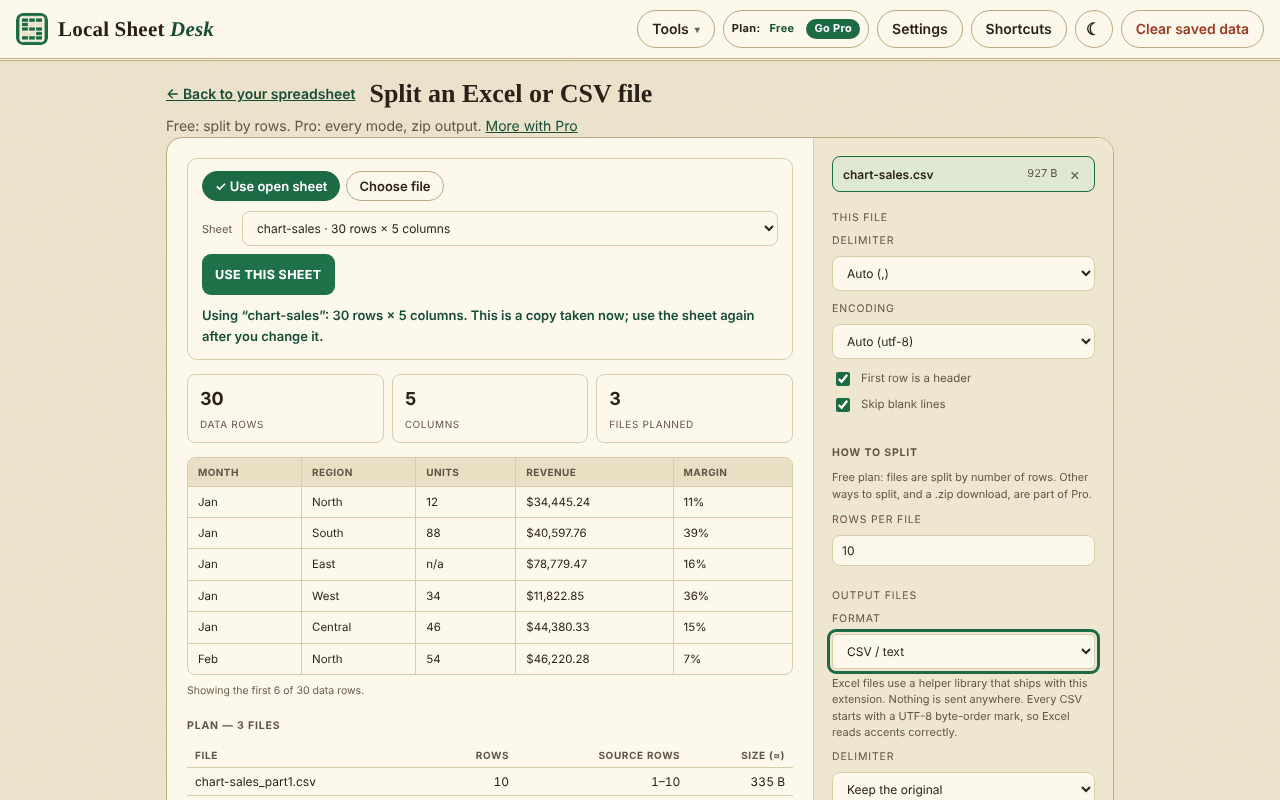
Split And Merge
Split a file into pieces of a set number of rows, or merge up to 5 CSV files into one. Results open as new tabs, so you can chain tools.
Right-Click To Open Web Tables
Right-click a table on a web page, or a link to a spreadsheet, and open it in SheetDesk. It reads only the page you right-click.
Your Files Stay On Your Device
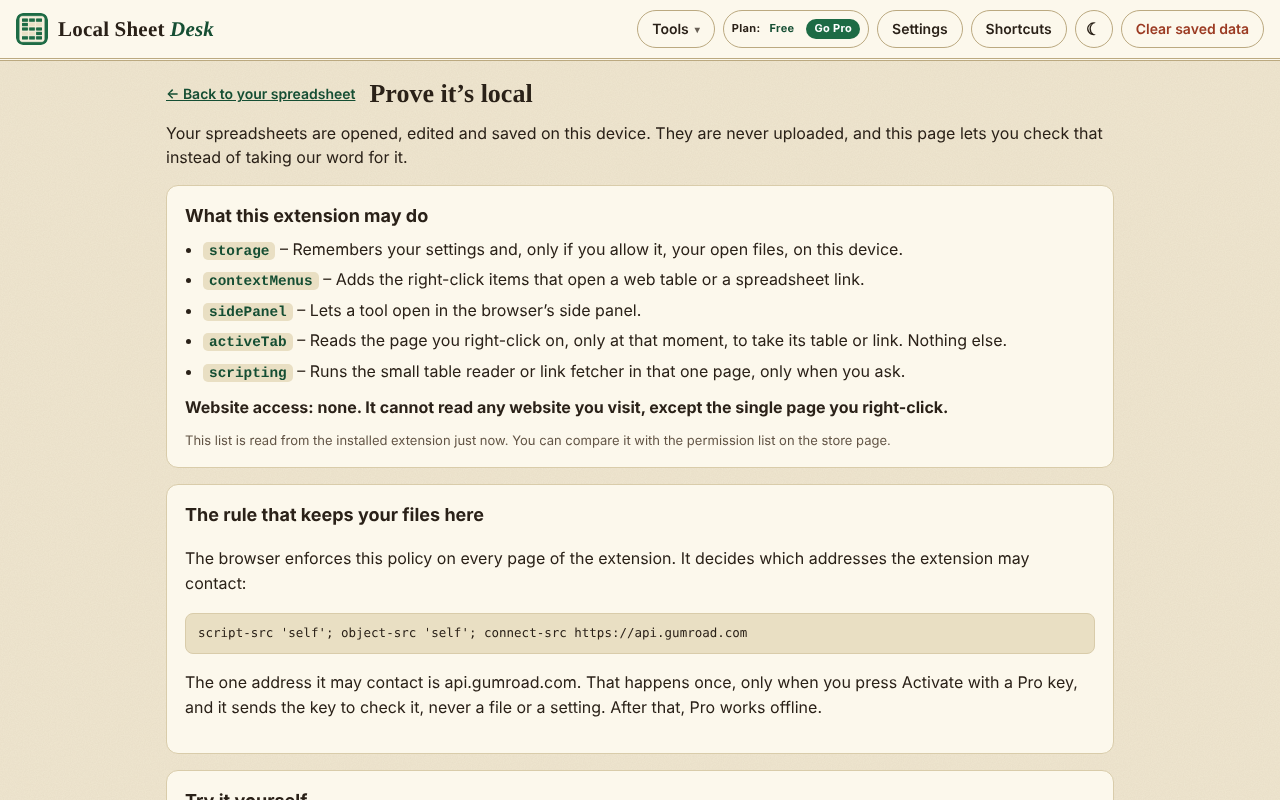
Files are read in your browser’s memory. SheetDesk has no account, no analytics and no remote code, and a Prove it’s local page lets you check.
See It In Action
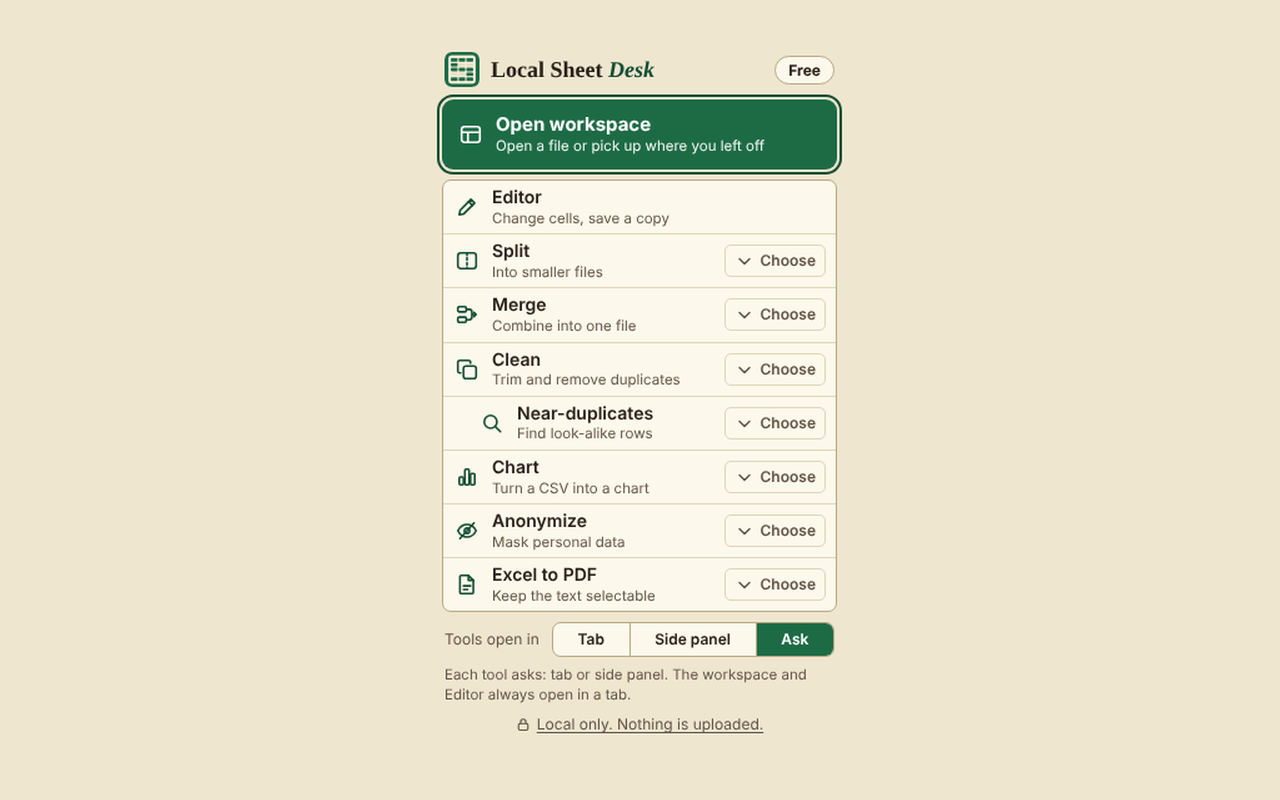
How It Works
Open A File
Click the SheetDesk icon and choose Open workspace, then drop a file in or choose one. You can also try the built-in sample.
Look, Fix Or Clean
Search, filter and sort, switch on Edit to change cells, or open a tool such as Clean, Split or Merge.
Save Or Export
Save a copy as .xlsx, or export CSV, JSON or HTML. Your files stay on your device the whole time.
Pricing
Free opens the first 20,000 rows of any file and covers editing, cleaning, split by rows, merging up to 5 files and charts. Pro adds bigger files and the power tools.
Pro Lifetime
$19 once
Yours for life. Later price changes never affect you. Launch price until 31 May 2027, then $29. Opens files up to 300,000 rows and adds History, PDF export, chart images, near-duplicate finder, unlimited merge, every way to split and Anonymize.
Buy Pro (opens in a new tab)
One payment, nothing renews. Use your licence on up to 3 devices. 30-day refund, handled by Gumroad. There is also a 3-day free trial of everything in Pro, started from the Plan screen in the extension, with no card.
Verify It Yourself
You shouldn’t have to take our word for it. Here is exactly what the extension can do, and how to check.
- storage
- Keeps your settings, your Pro licence key and the free-trial dates on your device. By default it also remembers your open files and edits in the browser’s own storage, and you can turn that off in Settings.
- contextMenus
- Adds the right-click items for opening a web table or a spreadsheet link here, and the toolbar icon menu.
- sidePanel
- Lets a tool open in the browser’s side panel next to the page. Optional: everything also works in a tab.
- activeTab and scripting
- Used only on the one page you right-click, after you choose the item, to take its table or fetch its link. Never runs on its own or on other pages.
- Website access
- None. SheetDesk has no host permissions, so it cannot read the websites you visit.
- Network
- One address only, api.gumroad.com, and only when you press Activate or Re-check with a Pro licence key. Your files are never sent. The browser enforces this with the extension’s security policy.
- Remote code
- None. Every script is bundled with the extension.
Open chrome://extensions, choose Details for SheetDesk (listed in the store as Local Sheet Desk) and check the permissions yourself. The Prove it’s local page inside the extension shows the same list and tests that outside connections are blocked. Read the privacy policy.
Questions
Does it upload my files?
No. Files are read and changed on your device. The only thing SheetDesk ever sends is your Pro licence key to Gumroad, when you press Activate or Re-check.
What can it open?
XLSX, XLS, XLSM, XLSB, ODS, CSV, TSV and DBF files, including password-protected ones. A copy you save is not password-protected.
Is there a size limit?
Free opens the first 20,000 rows of a file. Pro opens up to 300,000 rows.
Does it keep my files after I close it?
By default SheetDesk remembers your open files and edits in this browser, so you can pick up later. In Settings you can turn that off or delete saved files after 7 or 30 days, and Clear saved data removes everything at once.
What is free and what is Pro?
Free covers opening, editing and saving, exporting to CSV, XLSX, JSON, HTML or print, cleaning with exact duplicates, split by rows, merging up to 5 files, charts and the right-click items. Pro adds files up to 300,000 rows, the History list, PDF export, chart images, the near-duplicate finder, unlimited merge, every way to split and Anonymize.
What does Pro cost?
One payment, no subscription. See the Pricing section on this page for the current price.
Can I try Pro first?
Yes. There is a 3-day free trial of everything in Pro, started with a button from the Plan screen in the extension. It needs no card and never starts by itself.
Can I get a refund?
Yes. Pro has a 30-day refund, handled by Gumroad.
How many devices can I use Pro on?
One licence key works on up to 3 devices. To set up a new device, paste the same key there.
Does it work offline?
Yes. Nothing needs the internet except activating or re-checking a Pro key. After you activate, Pro works offline.
Why does the store call it Local Sheet Desk?
SheetDesk is the short name, and it is the name shown on the toolbar icon. The store listing uses the fuller name Local Sheet Desk so people searching for a spreadsheet tool can find it.
Does it work in other browsers?
SheetDesk is built for Chrome and Microsoft Edge.
Stay Updated
One email when we release a new extension, a major update or a new tool. We do not track opens or clicks.
Open Your Spreadsheet Without Uploading It.
No account, and your files stay on your device.
Coming soon to the Chrome Web Store